Guide
DCF Valuation in Excel Using AI
Build a full DCF valuation model in Excel with formulas preserved in the cells, including cash flow projections, discounting, terminal value, and enterprise value.
Introduction
Discounted Cash Flow, or DCF, is one of the most common Excel-based valuation methods in finance. It estimates what a business is worth today based on the cash it is expected to generate in the future.
In practice, a DCF model requires more than just a revenue forecast. It needs assumptions, free cash flow calculations, discounting, terminal value logic, and a structure that remains transparent enough to review and edit.
Scenario
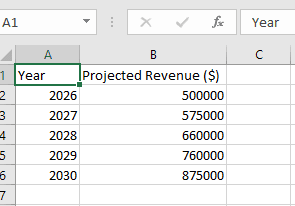
A finance analyst at a growing software company has prepared a spreadsheet with projected annual revenue for the next five years.
Leadership now wants to understand what the business may be worth today.
To do that, the analyst needs a complete DCF model that:
- derives cash flows from projected revenue
- applies operating assumptions
- discounts future cash flows to present value
- calculates terminal value
- produces a total enterprise value
- keeps formulas in the cells so the workbook remains editable
Building all of this manually in Excel would take time and require multiple linked calculations. They want Decide to create the model directly from the revenue projection sheet.
Prompt
Using this dataset, build a full DCF valuation model in Excel. Derive projected cash flows from the revenue projections and clearly label all assumptions used, including operating margin, tax rate, capital expenditure, working capital percentage, terminal growth rate, and discount rate. Calculate annual free cash flow for each forecast year, discount each cash flow to present value, calculate terminal value, and compute the total enterprise value. Create clear input, calculation, and output sections. Keep the formulas in the cells so the model remains dynamic and editable in Excel.
Source dataset
The starting point is a simple annual revenue projection sheet. Decide uses that base to create the full valuation model.
DCF model output
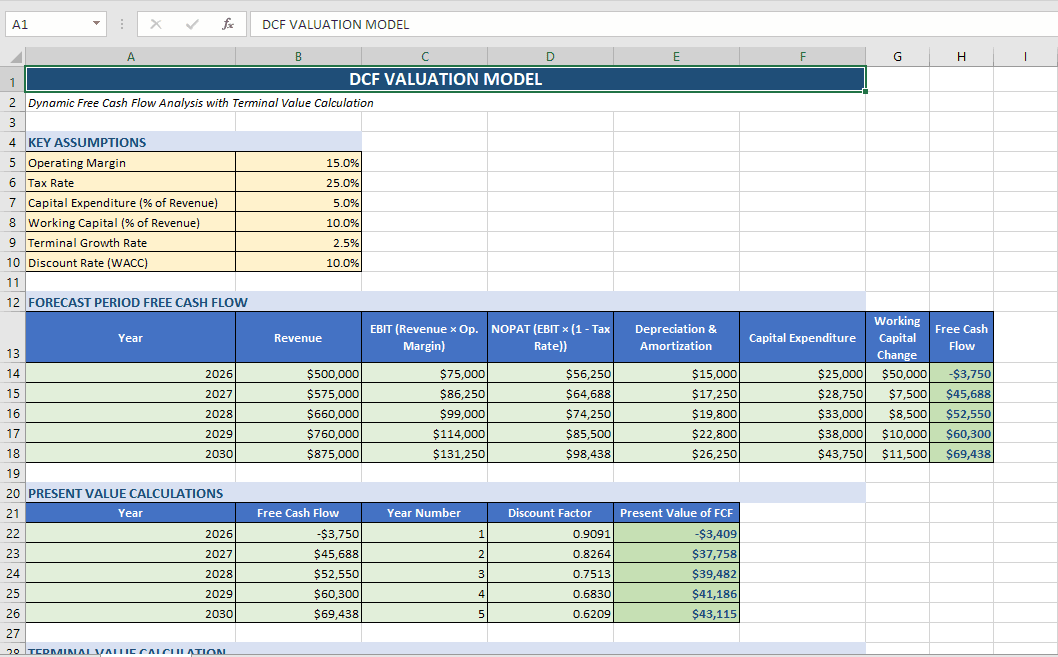
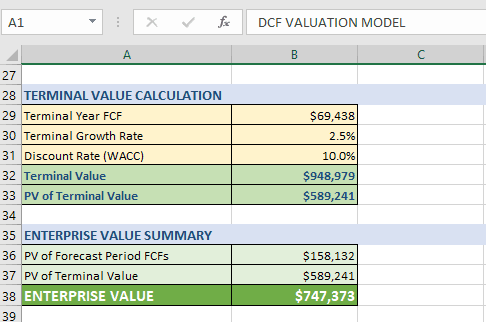
Decide expands the input sheet into a structured DCF workbook with assumptions, free cash flow calculations, discounting, and valuation summary.
What Decide builds
After running the prompt, Decide can produce:
- a dedicated assumptions section
- formula-driven annual free cash flow calculations
- discounted present values for each forecast year
- terminal value and present value of terminal value
- total enterprise value
- a workbook structure that is still editable in Excel
Review
1. Assumptions section
Decide creates a clear inputs area for core valuation assumptions such as:
- operating margin
- tax rate
- capital expenditure as a percentage of revenue
- working capital as a percentage of revenue
- discount rate
- terminal growth rate
That makes the model easier to audit and adjust.
2. Revenue-to-cash-flow calculation
Using the projected revenue data, Decide builds formulas to derive annual free cash flow. Depending on the dataset, this typically includes:
- operating profit from revenue
- tax-adjusted operating income
- capital expenditure deductions
- working capital adjustments
Because the formulas remain in the cells, the user can trace every step.
3. Discounted cash flow model
Decide then calculates:
- present value of each year’s free cash flow
- terminal value at the end of the forecast period
- present value of the terminal value
- total enterprise value
This keeps the model fully formula-driven instead of turning it into static output.
4. Clear model structure
The workbook should be organized into sections such as:
- Inputs
- Forecast calculations
- DCF valuation summary
That makes it easier to review internally or present to leadership.
Decision-making value
With this model, the finance analyst can:
- estimate what the business is worth today
- test how valuation changes under different assumptions
- support fundraising, investment, or acquisition work
- maintain a transparent model that can be updated over time
This is where Decide becomes more than spreadsheet automation. It can help users build a full financial valuation model in Excel while keeping the workbook practical, auditable, and editable.
Closing
Instead of wiring a DCF model manually from scratch, the analyst can prompt Decide to generate the structure, assumptions, and formulas directly inside Excel. That reduces setup time without sacrificing transparency.
Get started today with Decide
Related guides
Forecasting
How to Build a Revenue Forecast and Scenario Model in Excel with AI
Build a driver-based 6-month revenue forecast with base, best-case, and worst-case scenarios directly in Excel.
Pricing
How to Create a Profit Margin and Pricing Model in Excel with AI
Create a pricing model with profit, margin, break-even analysis, and scenario testing without building the formulas manually.
Forecasting
Trend and Time Series Analysis in Excel Using AI
Analyze trends, detect seasonality, and forecast demand from Excel data without pivot tables or formulas.