Guide
How to Create a Profit Margin and Pricing Model in Excel with AI
Build a pricing model in Excel with formulas for revenue, total cost, profit, profit margin, break-even point, and pricing scenarios using AI.
Introduction
Pricing is one of the most important decisions in a business. The right price determines whether a product is profitable, competitive, and sustainable.
Excel is commonly used to build pricing models, but those models often start as a simple input sheet and require additional formulas before they become decision-ready.
In this use case, Decide turns a simple dataset into a full pricing model that calculates profit, profit margin, break-even point, and pricing scenarios while keeping the formulas editable in Excel.
Scenario
A small business sells a consumer product and has basic spreadsheet data for:
- unit cost
- current selling price
- expected sales volume
The current spreadsheet only lists those values. It does not yet calculate:
- total revenue
- total cost
- profit
- profit margin
- break-even point
- pricing sensitivity under different selling prices
The owner wants to answer practical questions such as:
- How much profit am I making per product?
- What is my overall profit margin?
- What price should I charge to achieve a target margin?
- How many units do I need to sell to break even?
They want a structured Excel model that performs these calculations automatically and lets them test pricing decisions.
Prompt
Using this dataset, build a complete profit margin and pricing model in Excel. Create a clear inputs section including unit cost, selling price, and quantity. Calculate revenue, total cost, profit, and profit margin using formulas. Add analysis including profit per unit, break-even point, and margin per product. Create a pricing scenario section that shows how profit and margin change when the selling price is adjusted. Keep all formulas in the cells so the model remains dynamic and editable.
Source dataset
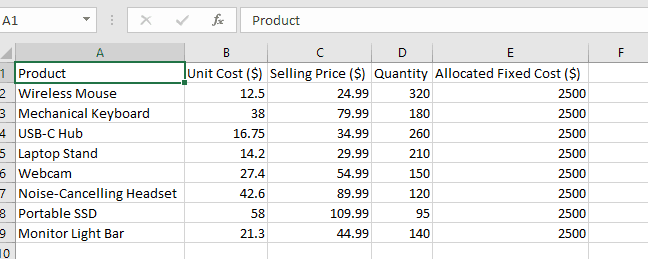
The starting sheet contains product-level unit cost, selling price, quantity, and allocated fixed cost.
Pricing model output
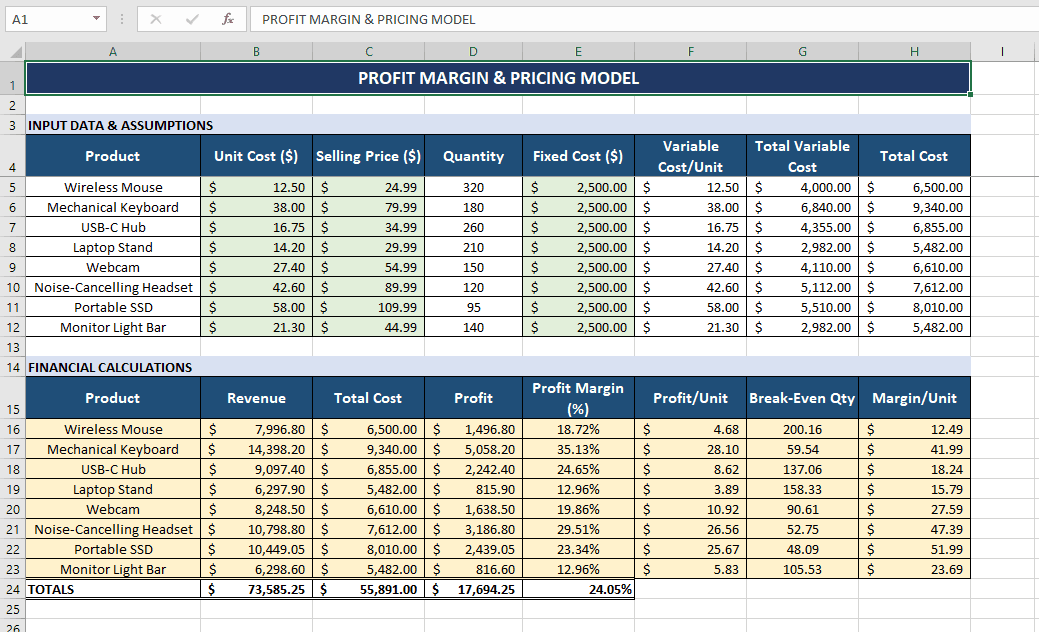
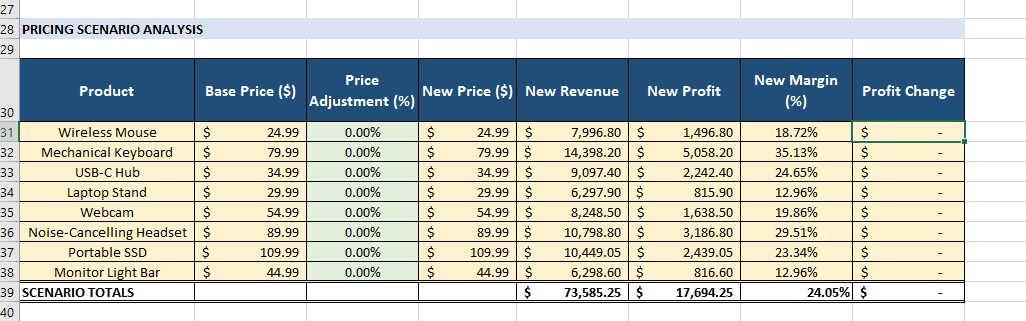
Decide turns the raw sheet into a profitability model with per-product calculations and a scenario block for price changes.
What Decide builds
After running the prompt, Decide can produce:
- a clear inputs section for core assumptions
- formula-driven revenue, cost, profit, and margin calculations
- profit-per-unit and margin analysis
- break-even analysis
- a pricing scenario table showing how results change as price moves
Review
1. Inputs section
Decide organizes the core inputs into a clean editable block:
- unit cost
- selling price
- quantity
This makes the model easy to adjust without breaking calculations.
2. Core calculations
Using formulas preserved in the cells, Decide computes:
- Revenue = Selling Price × Quantity
- Total Cost = Unit Cost × Quantity
- Profit = Revenue − Total Cost
- Profit Margin = Profit ÷ Revenue
This gives the user immediate visibility into profitability.
3. Profitability analysis
The model can also show:
- profit per unit
- margin per product
- total profit across the full sales volume
That helps the user understand both unit economics and total business impact.
4. Break-even analysis
Decide calculates:
- the number of units required to cover costs
- the minimum volume needed before profit begins
This is critical for planning and risk management.
5. Pricing scenario analysis
The scenario section shows how profit and margin change when the selling price changes. That makes it easier to answer questions like:
- What happens if I increase price by 10%?
- How does a discount affect margin?
- What price gets me to a target profit level?
Decision-making value
With this model, the business can:
- set pricing with more confidence
- understand the relationship between cost, price, and volume
- avoid underpricing products
- test pricing strategies before implementing them
For example:
- a small price increase may improve margin materially
- a cost reduction may matter more than chasing extra volume
Closing
This is one of the most practical Excel use cases for small businesses, operators, product managers, and finance teams. Instead of building the model manually, Decide can generate a pricing model that ties inputs directly to business outcomes and supports faster decisions.
Get started today with Decide
Related guides
Forecasting
How to Build a Revenue Forecast and Scenario Model in Excel with AI
Build a driver-based 6-month revenue forecast with base, best-case, and worst-case scenarios directly in Excel.
Valuation
DCF Valuation in Excel Using AI
Turn revenue projections into a full DCF model with assumptions, discounted cash flows, terminal value, and enterprise value.
Forecasting
Trend and Time Series Analysis in Excel Using AI
Analyze trends, detect seasonality, and forecast demand from Excel data without pivot tables or formulas.